
Training on Apple Watch
Start your workout on Apple Watch
Start a previously synced routine directly on Apple Watch. Log sets and control rest even when your iPhone is out of reach; your workout syncs later.
On this page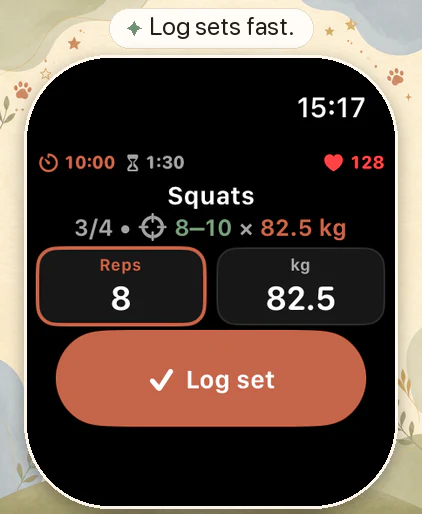
What you can record with LiftPal
- Up to five routines ready to start on Apple Watch
- Set entry and rest timer controls on your wrist
- Heart rate and active calories with optional permissions
- Apple Health access is optional and revocable
Start a routine on Apple Watch
Create routines on iPhone. Up to five are stored on Apple Watch and can be started there, even when your iPhone is unavailable.
The Watch stores sets and rest actions locally. LiftPal syncs those entries when the connection returns. Planning and the complete history remain on iPhone.
Finish the set, glance at your wrist
Log the set and start or manage your rest on Apple Watch while your iPhone stays to one side. The full plan and detailed analysis are available on iPhone.
Add heart rate and active calories if you want
With your permission, the Watch can show heart rate and active calories during the workout. The training log also works without Apple Health. Change your permissions at any time in system settings.
These values add activity data to your training history. LiftPal does not use them to make a medical assessment.
Designed for a paired Apple setup
Setup and syncing require a compatible iPhone running iOS 18 or later and a paired Apple Watch running watchOS 11 or later. Once a routine is cached, you can train from the Watch without the iPhone nearby.
No LiftPal account required
The Watch workflow does not require a LiftPal account. LiftPal shows no ads and processes workout data locally. Optional Health permissions use Apple’s permission system and remain separate from App Store purchases or support requests.
Quick answers
Apple Watch workout FAQ
Can I start a LiftPal workout directly on Apple Watch?
Yes. Start one of up to five routines previously synced from iPhone. When the phone is out of range, the Watch saves your sets locally and syncs them later.
What can I do from the Watch during a workout?
You can log sets and control the rest timer. With optional permissions, heart rate and active calories can also appear in the workout context.
Do I have to grant Apple Health access?
No. Apple Health is optional. You control individual permissions and can revoke them later in system settings.
Which workout metrics does the Watch show?
You can see the exercise, set progress, repetitions, weight and rest timer. Heart rate and active calories appear with the relevant Apple Health permissions. Your entries sync with iPhone when the connection is available again.
Sources
Official platform documentation
Protecting user privacy
Apple Developer Documentation · Apple Developer
Open original source