
Log strength training
A workout log for your sets, weights and progress
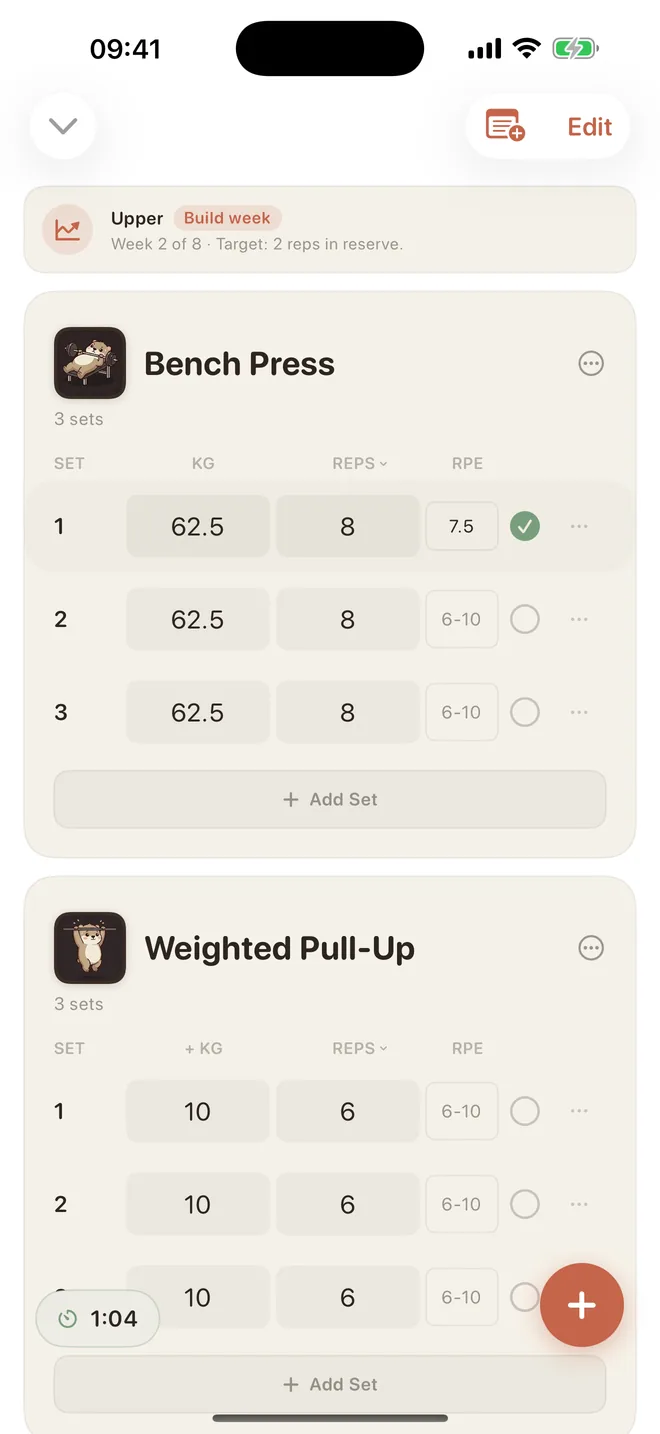
Open your routine, log the weight and repetitions, and record how hard the set felt. At your next workout, LiftPal shows your previous sets so you have a starting point for choosing your next weight.
On this page
What you can record with LiftPal
- Custom routines and spontaneous workouts
- Sets, repetitions, weight, and RPE
- Rest timer, history, statistics, and personal records
- Local processing with no LiftPal account or ads
Your routine is ready for the next workout
Following a regular plan? Save your exercises as a routine and open it again next time. You can also start a spontaneous workout when equipment is taken or you have less time today.
Log the weight and repetitions after each set. At your next workout, your previous numbers are there to pick up from.
How hard did that set feel?
Eight repetitions with 80 kg can feel easy one day and much harder the next. RPE records how demanding the set felt, alongside the weight and repetitions.
The rest timer keeps track of the break between sets. Take your recovery time and see when your planned rest is up.
Your previous sets, close at hand
Open your history to find earlier workouts, statistics and personal records. Before your next set, you can see the weight and repetitions you completed last time.
Smaller gains show up too: another repetition, the same weight with more left in reserve, or several strong sets in a row. RPE helps you understand those changes.
Start free, plan further with Premium
Routines, spontaneous workouts, sets, RPE, rest timer, history, statistics and personal records are part of the free log. The in-workout Coach also explains suggestions that you can accept or decline.
Premium adds four- to eight-week training blocks, the mesocycle generator and deeper analysis. Edit the exercises and targets to fit your training week.
Your workout stays a private training log
LiftPal requires no account or email address and shows no ads. Workout data is processed on your device. Exports you initiate, App Store purchases, and optional Apple Health permissions are separate, user-controlled processes.
Quick answers
Strength workout tracker FAQ
What can I record for each set?
You can log sets with repetitions, weight, and RPE. A rest timer, workout history, statistics, and personal records add context to those entries.
Can I start without a premade training plan?
Yes. Start a spontaneous workout or create your own routines for sessions you repeat.
Is the workout log free?
Yes. Core logging with routines, spontaneous workouts, set data, RPE, rest timer, history, statistics, and personal records remains free. Training blocks, the mesocycle generator, and additional coach analysis are Premium features.
Does LiftPal need an account or upload workouts to a cloud?
No. LiftPal requires no account, shows no ads, and processes workout data locally. Only actions you explicitly start—such as an export or optional Apple Health permission—leave that local workflow.
Sources
Research behind the planning principles
Progressive overload without progressing load? The effects of load or repetition progression on muscular adaptations
Plotkin et al. · PeerJ
Open original sourceProximity to Failure and Total Repetitions Performed in a Set Influences Accuracy of Intraset Repetitions in Reserve-Based Rating of Perceived Exertion
Zourdos et al. · Journal of Strength and Conditioning Research
Open original source